Create and Edit with Nano Banana Image
Turn a prompt or reference photo into a visual you can keep refining.
The Nano Banana Image workspace combines original generation and prompt-based editing in one workflow. Start from words or an upload, direct the important details, and develop a Nano Banana Image that fits your concept instead of settling for a generic first result.
How to Use Nano Banana Image Online
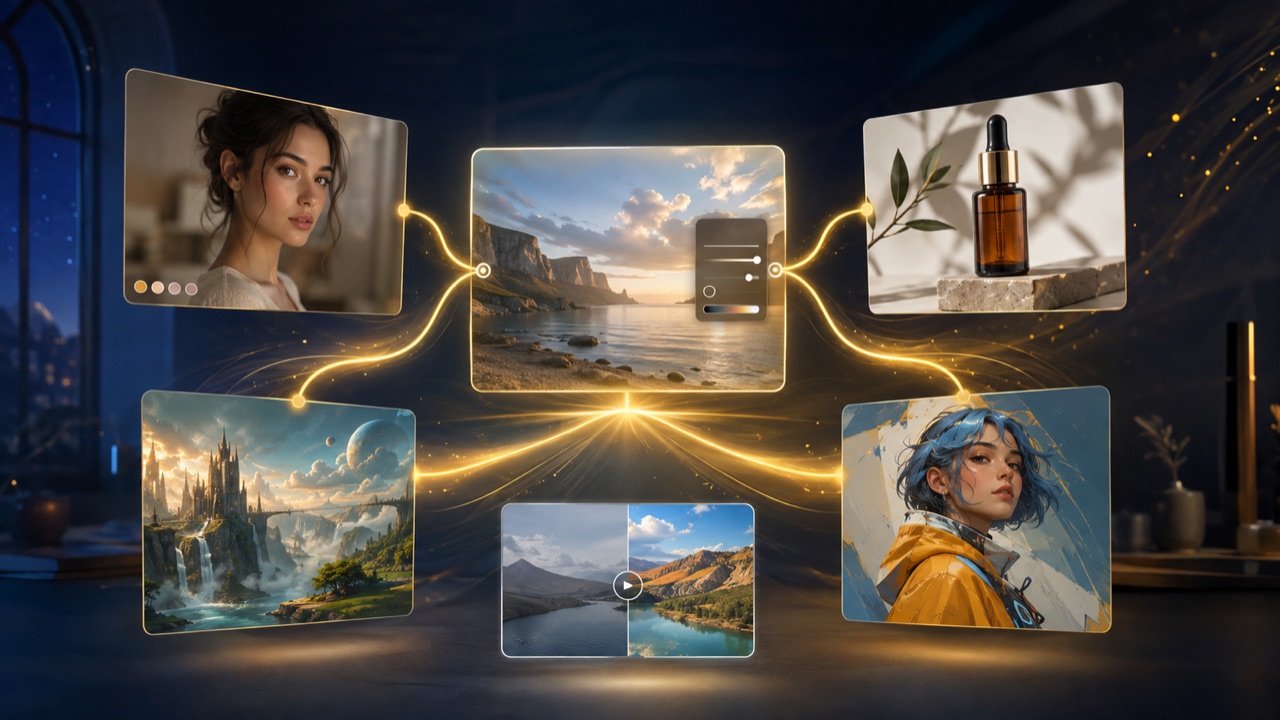
A productive Nano Banana Image session starts with a clear task. Decide whether you are creating a new scene, transforming a reference, or extending an existing visual direction. The Nano Banana image generator online then gives you one place to describe the result, review what changed, and continue with focused corrections.
Describe the Result You Need
Write the outcome as a short creative brief. For a new Nano Banana Image, identify the subject, action, setting, framing, lighting, and style. Include exact wording only when text must appear inside the picture. Useful Nano Banana prompts for image editing also name the element to change and the details that must remain untouched. This helps the AI image generator understand the relationship between your instructions rather than treating them as disconnected tags.

Upload References When Details Matter
Add an image when identity, product shape, composition, or art direction should guide the result. Tell Nano Banana Image what each upload represents and whether it is a subject, style, layout, or editing reference. A Nano Banana image to image workflow becomes more reliable when the prompt separates allowed changes from protected details. The AI image generator can then build on the source while reducing unnecessary drift from the original idea.
Generate and Refine One Change at a Time
Create the first Nano Banana Image and inspect the elements that matter most: identity, object geometry, written text, lighting, and hierarchy. Keep successful details, then request one precise revision instead of rewriting everything. Knowing how to use Nano Banana image generator tools this way makes comparison easier. Each round gives the AI image generator a clearer target and turns a promising Nano Banana Image draft into a more intentional final asset.
Nano Banana Image Generation and Editing Workflows
Nano Banana Image supports three practical entry points: create from a written brief, edit a supplied picture, or use references to extend a consistent direction. The Nano Banana image generator online keeps these tasks inside one conversational loop. Choose the workflow that matches your starting material, then judge every result against the intended outcome rather than treating generation itself as the goal.
Go from Nano Banana Text to Image
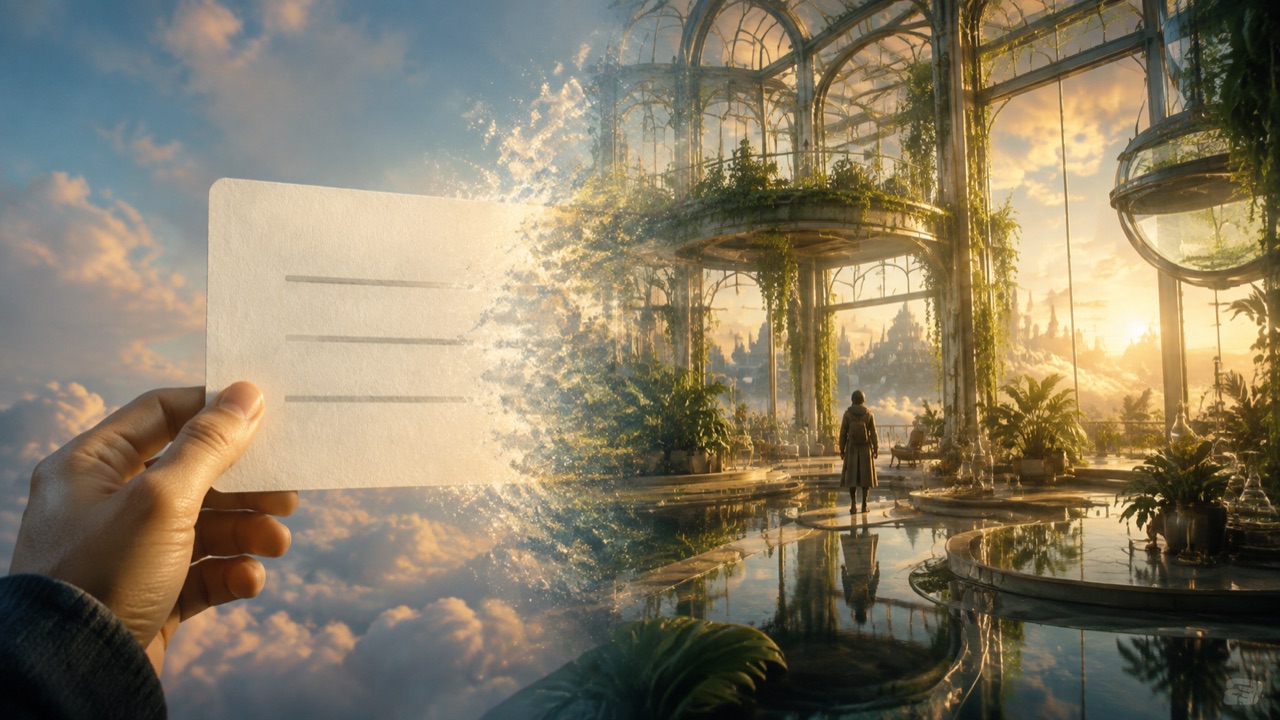
Use Nano Banana text to image when you have an idea but no starting artwork. Describe a complete scene: the focal subject, its action, the environment, framing, visual language, and lighting. Nano Banana Image can translate that brief into concept art, editorial photography, product imagery, posters, thumbnails, or explainers. The AI image generator is useful during exploration because one premise can be tested through several compositions. Compare each Nano Banana Image for clarity, not only polish. Simplify crowded supporting elements and specify scale or viewpoint when the subject lacks focus. Save the strongest Nano Banana Image with its prompt so the chosen palette and structure can anchor later variations.
Use Nano Banana Image Editor for Focused Changes
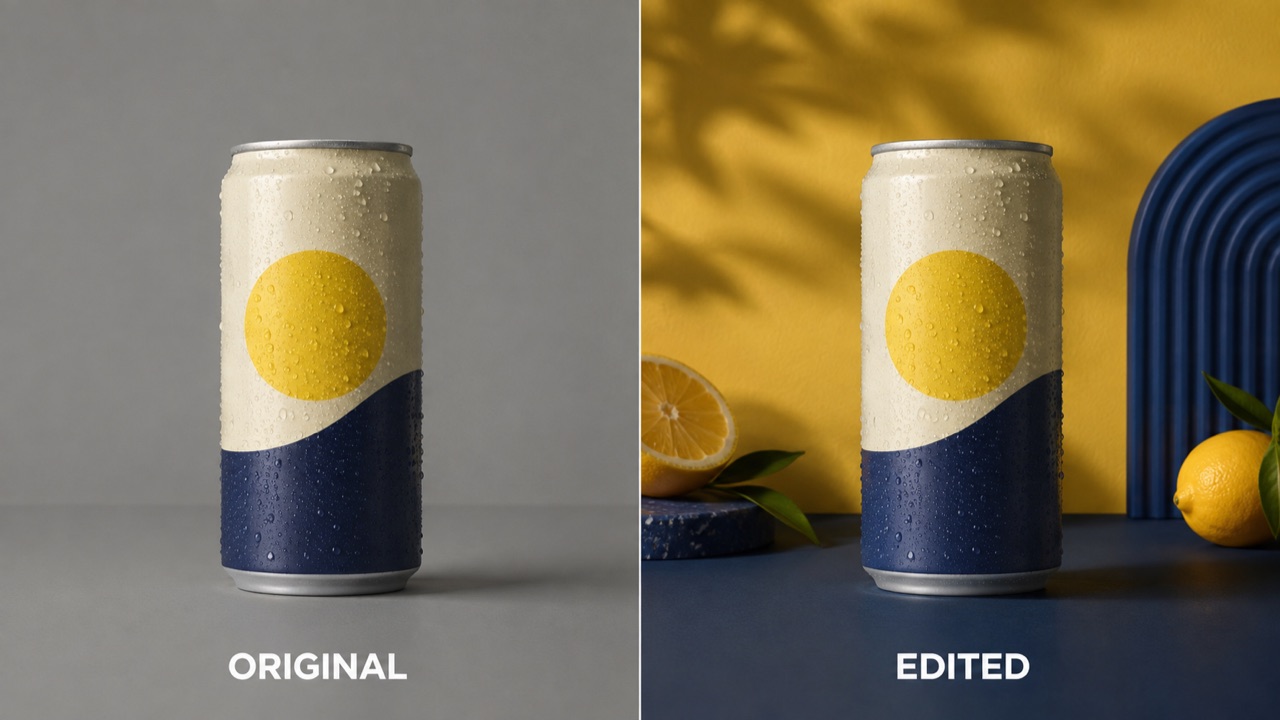
The Nano Banana image editor handles changes you can explain directly. Upload a portrait, product shot, room, landscape, or social image, then state what should be replaced, removed, restyled, or added. A strong edit also protects what already works. Name the face, pose, packaging, crop, perspective, shadows, or background elements that must stay consistent. The AI image generator reads the source and instruction together, avoiding a manual rebuild of every layer. Compare the edited result with the original for drift in identity, proportions, lettering, and reflections. Correct one issue at a time and repeat the invariants. The Nano Banana image editor works best as a controlled conversation, not a bundle of unrelated changes.
Build a Nano Banana Image to Image Series
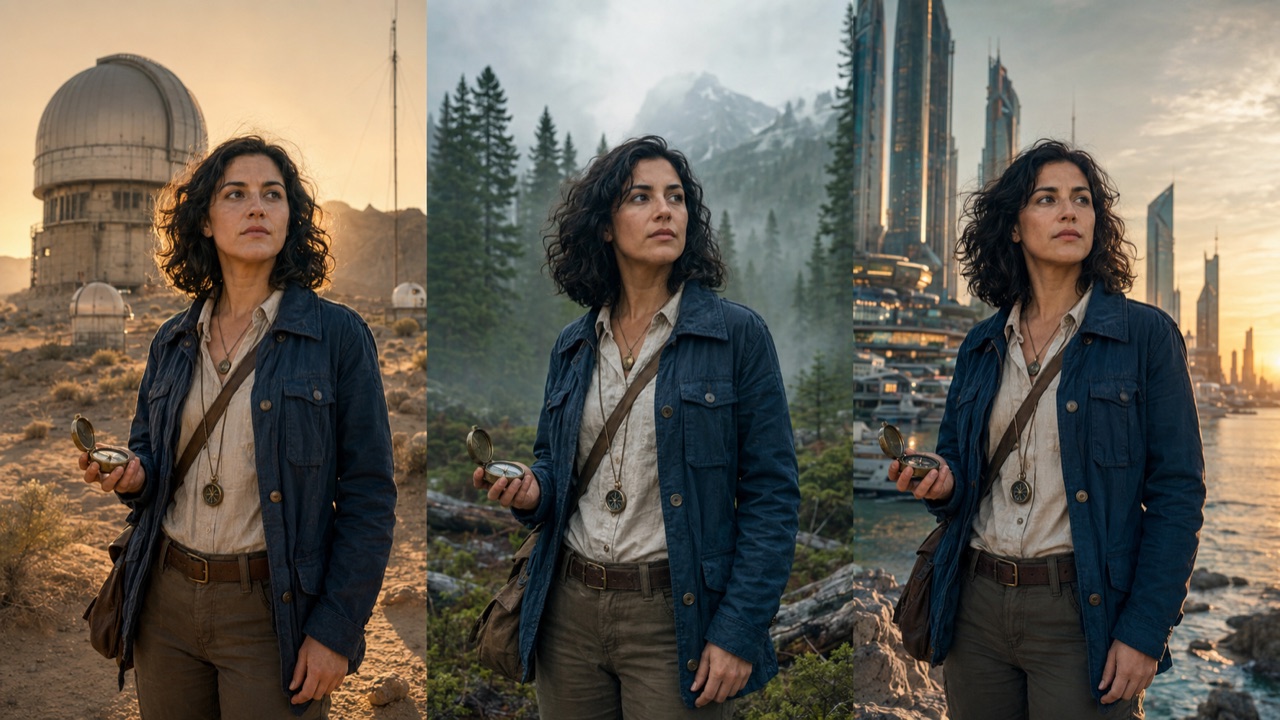
A Nano Banana image to image workflow helps one approved visual become a connected series. Use a reference to preserve a fictional character, product design, wardrobe, palette, or illustration system while exploring new actions and environments. Describe the stable anchors before requesting a variation, then change one variable such as location, pose, camera distance, or time of day. The AI image generator has a clearer comparison when every frame follows the same rules. Inspect the new result for changes in face shape, accessories, proportions, and materials. If continuity breaks, return to the strongest reference. This workflow supports storyboards, recurring campaigns, product scenarios, and visual worlds that need recognizable continuity.
What You Can Make with Nano Banana Image
Nano Banana Image can support commercial ideation, personal creativity, education, storytelling, and prompt-based photo work. The Nano Banana image generator online is most useful when the task has a clear audience and review standard. Choose references you are allowed to use, keep the original material, and check every Nano Banana Image before it becomes public-facing content.
Product and Campaign Concepts
Use this workflow to explore how an unbranded product could appear in a studio, seasonal setting, lifestyle photograph, or campaign concept. Start from text for early art direction or upload a packshot when shape, material, and label placement must guide the composition. The Nano Banana image editor can change the environment while preserving protected details. The AI image generator helps teams compare props, backgrounds, lighting, and audience cues before production. Check the result for warped packaging, invented lettering, or altered proportions. It can serve as a moodboard, internal concept, layout reference, or creative brief while final commercial material receives brand and rights review.
Portrait and Character Direction
Test wardrobe, location, era, camera treatment, and illustration style around a fictional or authorized subject. For a portrait edit, tell the Nano Banana image editor to keep facial structure, expression, hair, skin tone, pose, and framing stable. For a Nano Banana image to image series, reuse the clearest reference and list signature features in every prompt. The AI image generator can explore new scenes from a consistent foundation. Review each result for identity drift, obtain permission for real people's likenesses, and never present invented events as documentary evidence.
Editorial, Social, and Learning Visuals
Turn an article theme, lesson objective, presentation idea, or social post into a visual for a specific audience. Nano Banana text to image helps when stock imagery cannot express the exact concept. State the message, format, focal point, and complexity before decorative details. The AI image generator can produce an editorial scene, thumbnail, structured explainer, or campaign variation. If the result includes words, provide exact copy and proofread every character. Verify factual diagrams independently, because visual confidence does not guarantee accuracy.
Restoration and Creative Photo Changes
Use Nano Banana prompts for image editing to repair visible damage, recolor a memory, remove distractions, or reinterpret a photograph. The Nano Banana image editor should receive both the requested change and a preservation list. Keep an untouched original, then compare faces, objects, perspective, and historical details. The workflow can support careful cleanup or an openly creative transformation, but it cannot prove what missing details originally looked like. Label the AI image generator output appropriately when provenance matters. A responsible edit makes the transformation clear without presenting invention as restoration evidence.
How Teams Work with Nano Banana Image
These fictional scenarios show how Nano Banana Image may fit real creative processes. The Nano Banana image generator online works best when people define what success looks like, compare outputs, and keep human review inside the workflow. A useful Nano Banana Image is not simply impressive; it communicates the intended idea and survives careful inspection.
I use Nano Banana Image to turn an early campaign thought into concrete art-direction options. Nano Banana text to image helps us compare composition and tone, while the AI image generator keeps the process easy to explain. The strongest result becomes a shared reference rather than a finished advertisement, giving the team room to improve the idea without ambiguity.
I use Nano Banana Image to turn an early campaign thought into concrete art-direction options. Nano Banana text to image helps us compare composition and tone, while the AI image generator keeps the process easy to explain. The strongest result becomes a shared reference rather than a finished advertisement, giving the team room to improve the idea without ambiguity.
For storyboards, the Nano Banana image to image workflow is more valuable than unrelated frames. I protect the character's face, clothes, and key prop, then change one action or location. The AI image generator gives me options measured against the same rules. When a result drifts, I return to the approved reference instead of extending a long correction chain.
For storyboards, the Nano Banana image to image workflow is more valuable than unrelated frames. I protect the character's face, clothes, and key prop, then change one action or location. The AI image generator gives me options measured against the same rules. When a result drifts, I return to the approved reference instead of extending a long correction chain.
The Nano Banana image editor lets me explore a cleaner setting without losing the original packshot. I specify which parts may change and ask the AI image generator to protect geometry, material, and label placement. Every result is checked beside the upload, but the workflow makes background and lighting directions easier to compare. It bridges a rough idea and a production-ready brief.
The Nano Banana image editor lets me explore a cleaner setting without losing the original packshot. I specify which parts may change and ask the AI image generator to protect geometry, material, and label placement. Every result is checked beside the upload, but the workflow makes background and lighting directions easier to compare. It bridges a rough idea and a production-ready brief.
I learned how to use Nano Banana image generator tools without turning prompts into technical jargon. Starting with the lesson objective and audience gave the AI image generator a better direction. I simplified the composition through short follow-ups, then checked labels and facts independently. That review protects students from confusing a polished illustration with a verified source.
I learned how to use Nano Banana image generator tools without turning prompts into technical jargon. Starting with the lesson objective and audience gave the AI image generator a better direction. I simplified the composition through short follow-ups, then checked labels and facts independently. That review protects students from confusing a polished illustration with a verified source.
Nano Banana Image Generator FAQ
Find direct answers about Nano Banana Image generation, references, editing prompts, consistency, and provenance. The Nano Banana image generator online can simplify the creative interface, but the user remains responsible for input rights, output review, and appropriate disclosure whenever an AI image generator result could be mistaken for authentic evidence.
Nano Banana Image refers to a prompt-based workflow for Google's Gemini image-generation capabilities. It can create a new visual from text or edit supplied images conversationally. This page presents those generation and editing paths through one AI image generator interface rather than treating them as unrelated tools.
Choose whether to start from text or a reference, write the desired outcome, and generate. Review the first Nano Banana Image, keep the successful details, and request one focused correction. This iterative method gives the AI image generator clearer instructions than repeatedly replacing the entire prompt.
No. Nano Banana text to image can begin with a written description alone. Include the subject, environment, action, framing, lighting, and style for a coherent Nano Banana Image. Upload references only when an identity, object, layout, or established visual direction should influence the AI image generator output.
The Nano Banana image editor can support background changes, object edits, restyling, compositing, cleanup, and other prompt-defined transformations. State both the change and the elements Nano Banana Image must preserve. Compare the result with the original because the AI image generator may still alter unrequested details.
Nano Banana image to image uses one or more uploads as visual context for generation or editing. Explain each reference's role and identify protected features. The AI image generator can then create a Nano Banana Image that follows the source identity, composition, product, or style more intentionally.
State the exact edit first, then list what must remain unchanged. Good Nano Banana prompts for image editing protect identity, geometry, framing, perspective, and light direction when relevant. After generating, inspect the Nano Banana Image and give the AI image generator one correction at a time.
It can support consistency when strong references and repeated identity anchors are provided, but every result requires review. Use a Nano Banana image to image workflow and change one scene variable per round. Compare each Nano Banana Image for facial, wardrobe, accessory, and proportion drift.
Google states that images from its current Gemini image models include SynthID, an invisible digital watermark. Visible markings can vary by product surface and policy. Describe the actual implementation accurately and do not promise that a Nano Banana Image from the AI image generator has no provenance signal.
Start Your Nano Banana Image Workflow
Begin with a complete visual idea or upload a reference that already contains the details you want to keep. Use Nano Banana Image to create, compare, and refine the result through direct instructions. Whether you choose Nano Banana text to image, the Nano Banana image editor, or a Nano Banana image to image workflow, the AI image generator gives you a clear path from first prompt to reviewed creative asset.