AI Photo Editor: Edit Photos with AI in Seconds
Use AI Photo Editor to upload a reference image, describe the edit you want, and create clean, realistic results for portraits, products, social posts, and everyday images.
AI Photo Editor helps you turn a simple instruction into a polished edit. Upload an image, write what should change, choose your output settings, and generate a ready-to-use result without complex layers or manual retouching.
How to Use AI Photo Editor in 3 Simple Steps
The workflow is built for fast visual editing: upload a reference image, type your prompt, adjust essential output options, and let AI Photo Editor handle the transformation. AI Photo Editor keeps the process clear from first upload to final result.

Upload Your Reference Image
Start AI Photo Editor by adding the image you want to edit. Drag and drop a JPG or PNG, click to select a file, or choose one from your assets library. A clear reference image gives the AI image editor better visual context for accurate changes.
Describe the Edit in the Prompt Box
Write a direct prompt that explains what you want to change, remove, replace, enhance, or restyle. Use Free AI Photo Editor for quick tests, then refine the wording until AI Photo Editor understands the exact visual result you need.

Choose Output Options and Generate
Select the image size, resolution, number of images, and visibility setting that fit your purpose. Then click Generate Image. AI Photo Editor will create the edited result from your uploaded image and prompt.
What AI Photo Editor Helps You Do
AI Photo Editor is not just a quick filter. It helps users describe edits, repair visual problems, create cleaner images, and produce more useful results from photos they already have. The AI image editor and photo editor AI process make everyday image changes feel more direct.
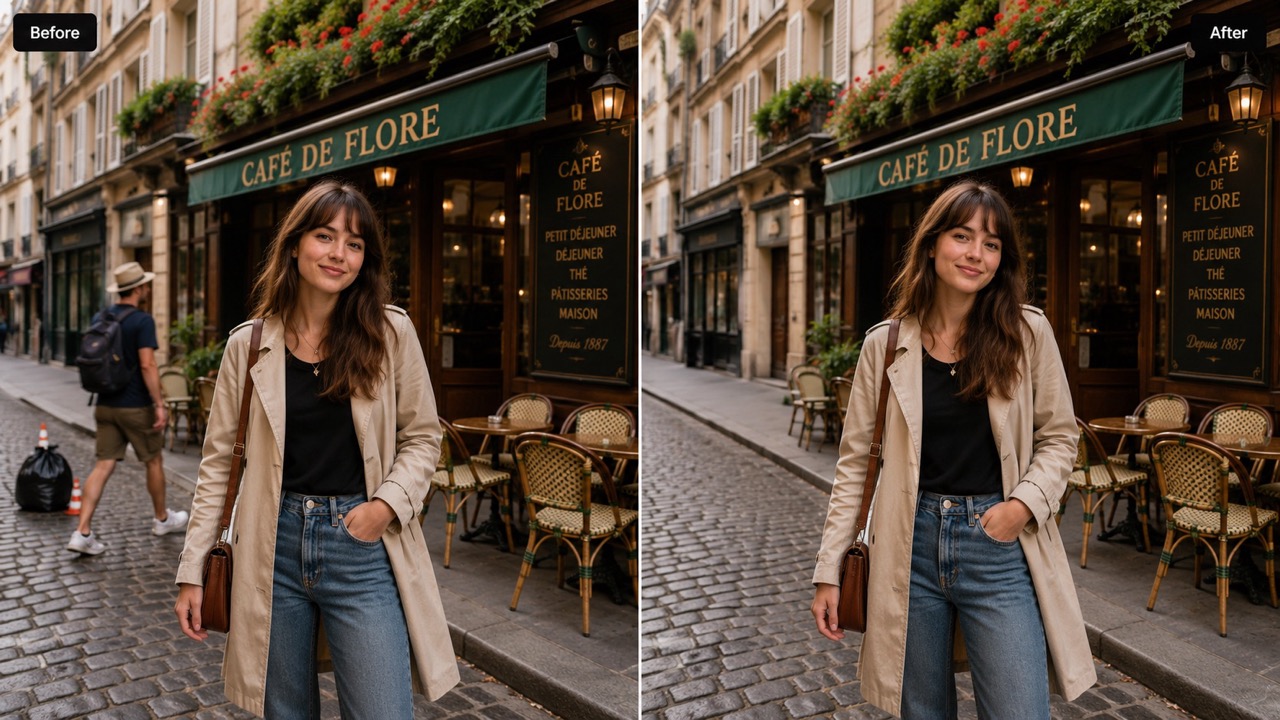
Turn Plain Instructions into Real Photo Edits
AI Photo Editor is made for people who know the result they want but do not want to rebuild an image by hand. Type a request such as remove the clutter, replace the sky, soften the light, or make the product background cleaner. The photo editor AI reads the uploaded image and your prompt together, so the change keeps the original subject, angle, and mood. This makes Edit Photos with AI useful for quick fixes, creative variations, and polished visual updates. The AI image editor can also turn vague ideas into clearer directions, while AI Photo Editor keeps the edit connected to the original photo. For beginners, photo editor AI guidance feels more natural than searching through hidden controls.
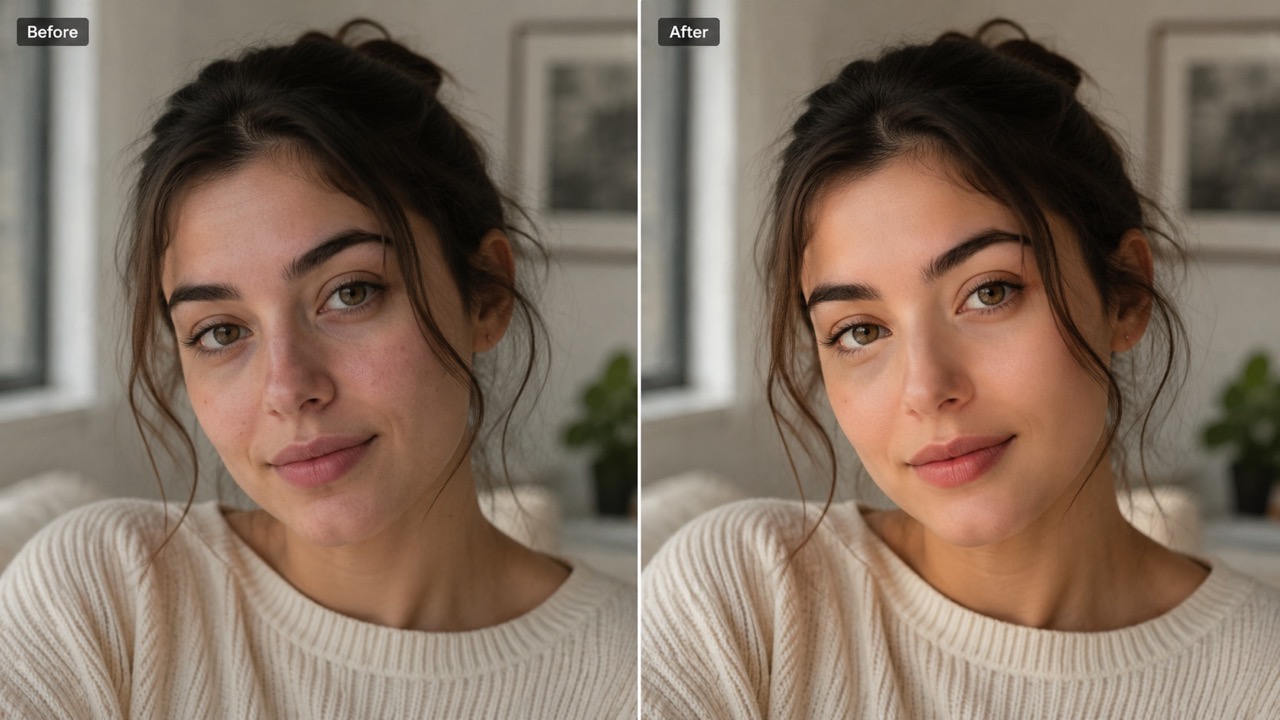
Clean Up Images Without Manual Retouching
Use AI Photo Editor to remove distractions, improve messy backgrounds, adjust lighting, and make a photo feel more intentional. The AI image editor is especially helpful when a good shot is almost right but needs one focused change. Instead of spending time with brushes, masks, or layers, describe the problem and let photo editor AI rebuild the edited area in a natural way. Free AI Photo Editor helps you test edits quickly before using the final image in a campaign, listing, profile, or post. The photo editor AI is ideal for small fixes that must look realistic.
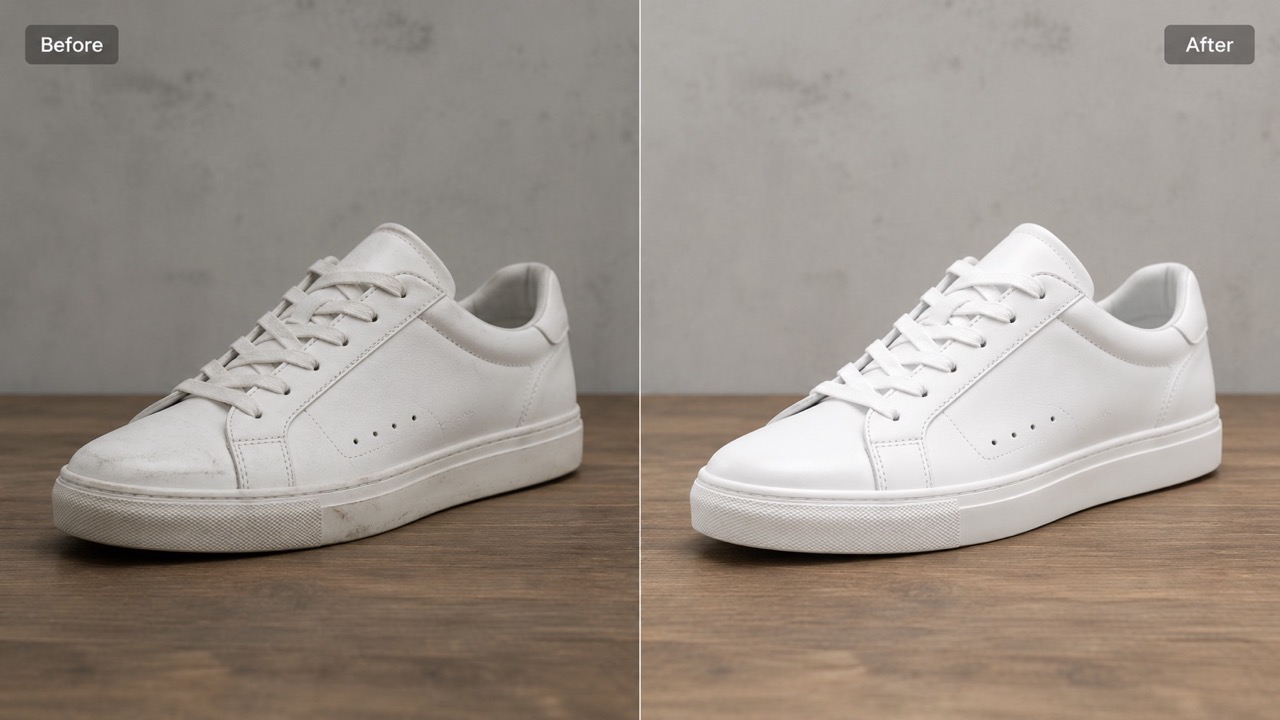
Create Better Visuals for Content and Commerce
AI Photo Editor supports practical image work for creators, sellers, marketers, and teams. Improve product photos, refresh social visuals, retouch portraits, test background ideas, or make a rough image match a brand direction. With AI image editor with prompt free options, you can explore several prompt ideas before choosing the strongest version. AI photo editor online free access also helps users work from a browser, making image updates faster when deadlines are tight and design resources are limited. The AI image editor and photo editor AI workflow reduce repeat tasks while keeping creative control in your hands.
Who Can Use AI Photo Editor?
AI Photo Editor is useful for anyone who needs clearer, cleaner, or more creative images from an existing photo, whether the goal is personal, professional, or commercial. The photo editor AI approach keeps editing focused on results instead of technical steps.

Creators Making Social Content
AI Photo Editor helps creators turn casual images into post-ready visuals. Remove distracting objects, change the mood, refine lighting, or test a new background. AI image editor with prompt free workflows let creators try multiple ideas without starting over. For thumbnails, stories, profile images, and campaign posts, Edit Photos with AI can save time while keeping the original subject recognizable. The AI image editor also helps maintain a consistent look across a content series. AI Photo Editor gives each prompt another chance to become a usable visual.

Online Sellers Improving Product Photos
Product images often need cleaner backgrounds, balanced light, or small object fixes. AI Photo Editor helps sellers improve a photo without arranging another shoot. Use Free AI Photo Editor to test prompt ideas, then make the product look clearer and more presentation-ready. The AI image editor can support product listings, ads, banners, and seasonal visual refreshes. Photo editor AI editing also helps small shops create images that feel consistent across many products.

Marketers Building Campaign Visuals
Marketers can use AI Photo Editor to adapt images for different messages. Replace a background, add a cleaner setting, adjust the tone, or make the scene feel more aligned with a promotion. A photo editor AI can help teams move faster when campaign concepts need quick visual tests. AI photo editor online free is useful for drafting ideas before final approval. AI Photo Editor also lets marketers compare prompt directions before choosing the image that supports the offer best. Photo editor AI generation can turn early copy ideas into images that are easier to discuss.
Everyday Users Fixing Personal Photos
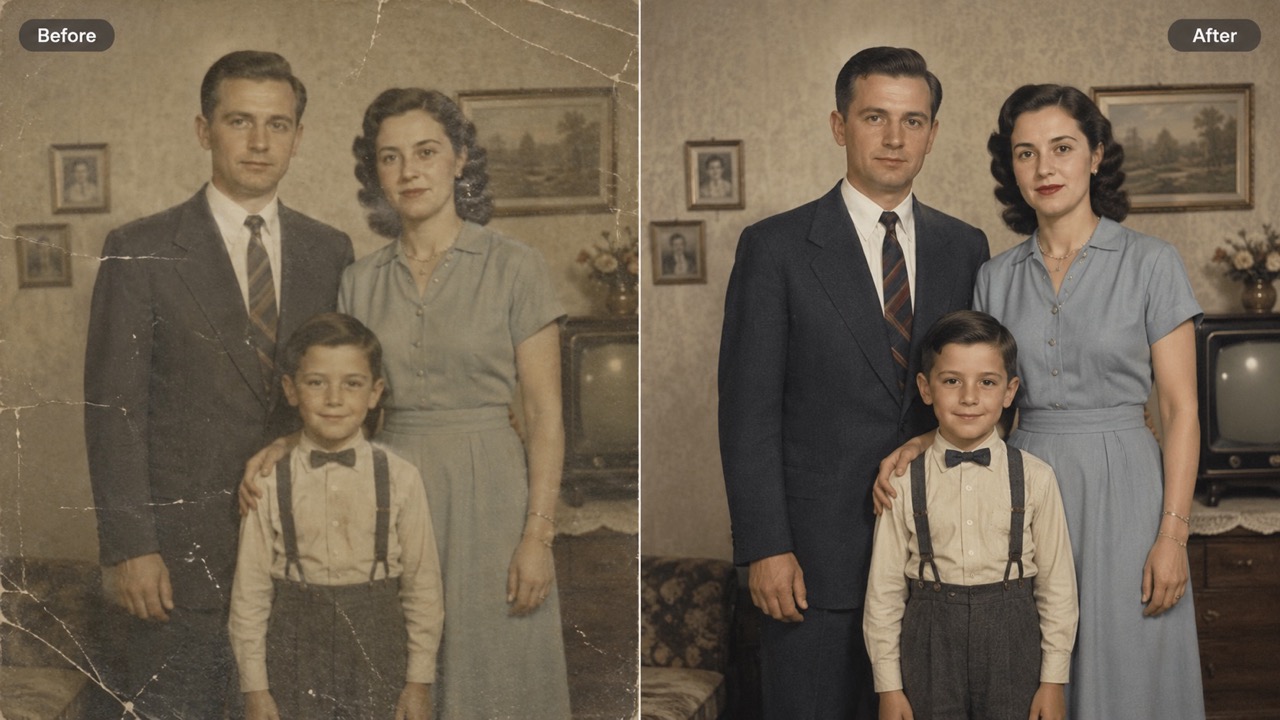
AI Photo Editor also works for personal pictures. Remove an unwanted object, brighten a dark image, retouch a portrait, restore an old photo feeling, or change a plain background. Free online AI Photo Editor access makes simple image improvement more approachable. AI image editor with prompt free editing lets users explain the result in normal words instead of learning complex tools. The photo editor AI can help preserve a natural look, so personal photos do not feel over-edited.
What Users Say About AI Photo Editor
Users choose AI Photo Editor when they need fast prompt-based edits that make images cleaner, more useful, and easier to share. The AI image editor helps them test ideas quickly, while photo editor AI output keeps results natural.
I used AI Photo Editor to clean up product shots before posting them online. I typed a prompt to remove background clutter and improve the light, and the result looked much more professional. The AI image editor helped me move faster than manual editing, and the photo editor AI understood the product shape without making it look fake.
I used AI Photo Editor to clean up product shots before posting them online. I typed a prompt to remove background clutter and improve the light, and the result looked much more professional. The AI image editor helped me move faster than manual editing, and the photo editor AI understood the product shape without making it look fake.
My social photos often need small fixes, not a complete redesign. AI Photo Editor lets me upload the image, describe the change, and generate a usable version. Free AI Photo Editor is great for testing ideas, especially when I want to Edit Photos with AI quickly. The AI image editor keeps the edits subtle enough for real posts.
My social photos often need small fixes, not a complete redesign. AI Photo Editor lets me upload the image, describe the change, and generate a usable version. Free AI Photo Editor is great for testing ideas, especially when I want to Edit Photos with AI quickly. The AI image editor keeps the edits subtle enough for real posts.
I needed campaign visuals in different moods. AI Photo Editor made it easy to try warmer lighting, cleaner backgrounds, and small object changes. The photo editor AI followed my prompt surprisingly well, and AI photo editor online free access made concept testing simple. It helped us compare directions before asking for final creative review.
I needed campaign visuals in different moods. AI Photo Editor made it easy to try warmer lighting, cleaner backgrounds, and small object changes. The photo editor AI followed my prompt surprisingly well, and AI photo editor online free access made concept testing simple. It helped us compare directions before asking for final creative review.
I tried free online AI Photo Editor on old family photos and was impressed by how natural the edits looked. I could remove distractions and improve the image without overprocessing it. AI image editor with prompt free editing made the whole process easy. The photo editor AI gave me results that still felt personal.
I tried free online AI Photo Editor on old family photos and was impressed by how natural the edits looked. I could remove distractions and improve the image without overprocessing it. AI image editor with prompt free editing made the whole process easy. The photo editor AI gave me results that still felt personal.

FAQs About AI Photo Editor
Get quick answers about AI Photo Editor, prompt writing, image editing options, and practical use cases. These answers explain how the AI image editor and photo editor AI workflow can support simple edits.
Upload a reference image, write a clear prompt, select your output options, and generate. AI Photo Editor uses the image and prompt together to create the edit, while the AI image editor keeps the process simple.
You can remove objects, change backgrounds, improve lighting, retouch portraits, enhance product images, and create visual variations with AI Photo Editor and photo editor AI prompts.
Yes. AI image editor with prompt free editing lets you describe changes in plain English, such as remove the chair or make the background white. AI Photo Editor turns that prompt into an image edit.
Use a clear image and write a specific prompt. Photo editor AI performs better when the subject, desired change, and style are easy to understand.
Yes. AI photo editor online free access works in a browser, so you can edit from desktop, tablet, or mobile without installing anything. AI Photo Editor stays easy to access.
Yes. Free online AI Photo Editor can help improve product photos, marketing visuals, profile images, social posts, and personal pictures with AI image editor support.
Start Editing with AI Photo Editor Today
Upload a photo, describe your change, and let AI Photo Editor generate a cleaner, more creative image. Use Free AI Photo Editor, AI image editor with prompt free, AI photo editor online free, and free online AI Photo Editor options to explore fast prompt-based editing. Free online AI Photo Editor makes it easier to test ideas before choosing your final result.